Sn0wbreeze 2.2.1 Download Available: Fixes iBooks

Sn0wbreeze for Windows users has been updated to 2.2.1 by iH8sn0w. This latest release fixes the iBooks issue, and includes drag and drop for firmware files, plus fixes iREB issues for the iPhone 3G on “Waiting for iBSS”. It will also jailbreak iOS 4.2.6 for Verizon iPhone users.

How is sn0wbreeze different from greenpois0n?

Sn0wbreeze is the Windows equivalent of PwnageTool. These two jailbreak tools create a custom jailbroken firmware that you use to restore your iPhone with. Sn0wbreeze/PwnageTool will allow you to update to the latest firmware while keeping your existing baseband firmware for those that need an unlock. So after using sn0wbreeze/PwnageTool you can then use ultrasn0w 1.2 to unlock your iPhone 4/3GS/3G.

If you don’t care for an unlock, just use our greenpois0n tutorials for iOS 4.2.1.

Click here to download Sn0wbreeze 2.2.1 for Windows users.

[Update] iPad 2 Event Set For March 2, 2011

Update 1: Looks like the NYT and Reuters have updated their articles to confirm this March 2nd date, according to their sources.

From Reuters:

One person familiar with the matter said recent speculation about a delay until June was “simply not true” as Apple is planning a launch in the same seasonal schedule as the first iPad, which went on sale in April 2010.

For everyone who has been following the iPad 2 hardware, software, and release date rumors, a bombshell has just been dropped.

Apple has reportedly scheduled an iPad 2 media event for March 2, 2011.

As the rumors have pointed out over the last several months, the iPad 2 is expected to be thinner, feature a better display, a faster processor, have larger storage, and feature front and back facing cameras.

According to sources close to the media event situation, the March 2 event is firm and will be held in San Francisco at the Yerba Buena Center for the Arts.

At this time, it is unclear when Apple will be sending out invites, but it will probably be late this week or early next week.

[All Things Digital]

The iPad 2 Review You’ve Been Waiting For [Video]

The iPad should be getting a refresh soon from Apple. What will the iPad 2 bring? Rumours point to possibly a new 6-inch iPad, front-facing camera, no Home button, and a new enhanced A4 chip.

We also keep hearing about a larger resolution on the iPad 2, which brings us to the following video review of the next iPad 2. I think you’re going to want this:

The video was made by Norwegians Eskild E. Fors and Anders Overgaard. It’s a bit over the top, but has its moments. Well done guys.

[TNW via itavisen.no]

How to Fix iBooks Error After 4.2.1 Jailbreak: iBooks Fix via Cydia

Have you encountered that message above?

There is a problem with the configuration of your iPhone. Please restore with iTunes and reinstall iBooks.

Are you looking for a fix for iBooks after jailbreak iOS 4.2.1 via Greenpois0n? A solution is now available in Cydia that will solve the problem of iBooks refusing to open content on jailbroken devices.

Here’s How to Fix the iBooks Error via Cydia

1. Launch Cydia –> Manage –> Sources –> Edit –> Add

2. Enter the following repository: http://repo.insanelyi.com , tap Add Source

3. Search for’iBooks Fix’ and install it.

After the install of iBooks Fix, you should be able to read your books on iOS 4.2.1. By installing this tweak via Cydia, you won’t have to re-jailbreak with PwnageTool 4.2/sn0wbreeze 2.2 to fix iBooks. This will save some time and trouble.

Let me know how iBooks Fix works for you. Happy reading. :)

[insanelyi]

How to Jailbreak iPhone 4.2.1 with PwnageTool 4.2 (Mac)

If you want to jailbreak your iPhone on iOS 4.2.1, and you don’t require an unlock, use Greenpois0n. However, if you want to remain at an unlockable baseband, you’ll want to use PwnageTool 4.2 (Mac) or sn0wbreeze 2.2 (Windows).

Here’s a brief tutorial on how to jailbreak your iPhone on iOS 4.2.1 with PwnageTool. It’s straightforward and similar to Greenpois0n, except you will restore iPhone with a custom firmware that PwnageTool 4.2 will create for you.

By restoring with a custom firmware, and not updating to 4.2.1 in iTunes, your iPhone baseband will remain the same. This only applies to people who need an unlocked iPhone, and want to continue with an unlockable baseband.

As always, jailbreak at your own risk. We are not responsible for anything that goes wrong.

Brief Step by Step Guide on How to Jailbreak your iPhone on iOS 4.2.1 with PwnageTool 4.2 (Mac Only)

1. Download the latest version of iTunes. Sync your iPhone before you begin.

2. Download iOS 4.2.1 firmware for your iPhone here, and PwnageTool 4.2 here. Save both to your desktop.

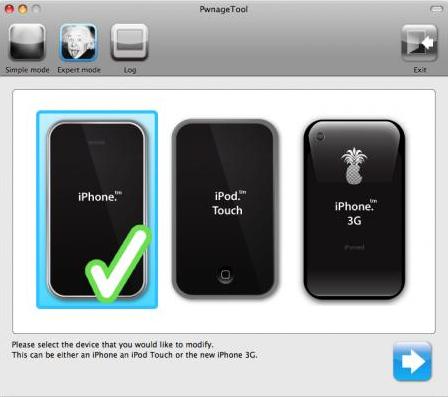
3. Launch PwnageTool, and select Expert Mode, then select your device.

4. Browse for iOS 4.2.1 firmware, click Open. Next, select ‘General’. If your iPhone is on an official carrier, untick ‘Activate the phone’. If you want to use your iPhone on an unofficial carrier, tick this box.

5. Click Build, then PwnageTool will start creating the custom firmware to jailbreak your iPhone. You will be asked for your system password for PwnageTool to proceed. Choose your desktop to save the Custom firmware:

6. Now, you’ll have to enter DFU mode (if this messes up, try again; takes some practice) by:

a) Hold the Power/Home buttons for 10 seconds
b) Release the Power button, but keep holding Home for 10 seconds
c) If successful, you’ll be in DFU mode.

7. Launch iTunes, select your iPhone. Press ‘Alt/Option’ on your keyboard, then click on ‘Restore.’ An iTunes prompt appears–select the CUSTOM firmware created by PwnageTool.

8. As your iPhone restores (10 minutes or so), it will be jailbroken on iOS 4.2.1, with your existing baseband. The iPhone should reboot, and the jailbreak will be done. Cydia will now be on your homescreen.

sn0wbreeze 2.2 Jailbreak for 4.2.1 Download Available

Hot on the heels of the release of the jailbreak tool PwnageTool 4.2, which allows for custom firmware restores for Mac users, sn0wbreeze 2.2r2 has been released for PC users. sn0wbreeze essentially is PwnageTool for Windows users. It also includes the latest iBook and AT2 wifi fixes.

sn0wbreeze 2.2 uses the same untethered jailbreak from Greenpois0n. Canadian iPhone hacker/developer ih8sn0w released it just over an hour ago:

Click here to download sn0wbreeze 2.2r2 for Windows.

Let us know how this works for you!

[ih8sn0w]

PwnageTool 4.2 Download Now Available; Fixes iBooks Issue

The iPhone Dev Team has just released PwnageTool 4.2, which will allow for iPhone unlockers to restore with a custom firmware to retain their existing baseband and unlock. They used the “feedface” untether from Greenpois0n, with permission from the Chronic Dev Team.

So if you own an iPhone 4, and want to retain your baseband but update to iOS 4.2.1, you want to use PwnageTool.

There are also two improvements to the iOS 4.2.1 jailbreak:
- fixes the iBooks issue
- fixes the wifi problem with Apple TV 2G

PwnageTool also supports all the other 4.2.1 devices other than iPod touch 2G:

iPhone3G
iPhone3GS
iPhone4
iPhone4-Verizon
iPod touch 3G
iPod touch 4G
iPad
AppleTV 2G

An Untethered Jailbreak for iOS 4.3 is Around the Corner

With iOS 4.3 around the corner, it looks like there is hope for an untethered jailbreak:

It also appears that a security researcher named @i0n1c has a 4.3 untether ready for when Apple releases the final 4.3 FW, so it may not be a long wait at all with 4.3!

PwnageTool is for Mac only. Download here. Let me know how it works for you!

[iPhone Dev Team]