iPad 2 Event In Late February, March Release?

This week, Macotakara reports that Apple is planning a media event near the end of February to launch the next-generation iPad. A release date has been estimated for March 2011.

Aside from a possible event, the site offers no other additional details. Due to the lack of details, the legitimacy of the claims is unknown. However March is an expected time-frame for the next-generation iPad release.

Recent stories point to iPad 2 devices seen in the wild, with various component makers further revealing, mostly, unconfirmed production part reports.

[Macotakara]

A dash of speed, 3D and apps

A dash of speed, 3D and apps: "Today, we’re excited to bring several new features from Chrome’s beta channel to the stable build, including WebGL, Chrome Instant, and the Chrome Web Store.

WebGL is a new technology which brings hardware-accelerated 3D graphics to the browser. With WebGL in Chrome, you can experience rich 3D experiences right inside the browser with no need for additional software. Curious about the three-dimensional possibilities? Try out these demos to experience the power of WebGL in the latest stable version of Chrome.

With Chrome Instant (à la Google Instant), web pages that you frequently visit will begin loading as soon as you start typing the URL. (“Look, Mom - no enter key!”). If supported by your default search engine, search results appear instantly as you type queries in the omnibox. To try out Instant, you’ll need to enable it in the Basics tab of Chrome’s options.

Lastly, the Chrome Web Store is now open to all Chrome users in the United States. As part of this, we’ve now added a link to the Chrome Web Store on the New Tab page, along with two sample apps. (If you don’t use these sample apps, they will automatically disappear after some time).

Some of the newest additions in the Chrome Web Store include BBC GoodFood, Autodesk, Sesame Street, nine King.com Games and Marvel Comics. There are also many apps that take advantage of the latest web technologies to deliver an immersive experience, such as Tweetdeck and The New York Times. While the store is currently only available for Chrome users in the U.S., we’re working hard to expand availability to users around the world soon, so stay tuned!


Posted by Erik Kay and Aaron Boodman, Software Engineers
"

How to Jailbreak your iPhone on iOS 4.2.1 with Greenpois0n

Update 1: Greenpois0n RC5.2 has been released. Official link is here. Unofficial download links here or here.

Looking to jailbreak your iPhone 3GS, iPhone 4, iPad or iPod Touch 3G/4G? You have come to the right place!

NOTE: THIS GUIDE WILL NOT UNLOCK YOUR iPHONE (guide coming soon to preserve baseband)

Read Me Before Continuing:

  • Use at your own risk, we are not responsible for your decision to jailbreak.
  • Do you plan on unlocking your iPhone 3GS/4 in the future? Do not use this guide.
  • You must be updated to iOS 4.2.1 via the latest version of iTunes before proceeding.
  • Your iPhone/iPod touch must be activated (screen does not show “Connect to iTunes”)

This Guide Has Two Sections:

A. How To Jailbreak the iPhone 3GS/4 & iPod Touch 3G/4G on 4.2.1 Firmware
B. How To Revert Your iPhone 3GS/4 or iPod Touch Back To “Normal”

——

A.) How To Jailbreak the iPhone 3GS/4 & iPod Touch 3G/4G on 4.2.1 Firmware

To jailbreak your iDevice on the 4.2.1 firmware, ensure you have access to WiFi and follow the steps below:

1. Plug your iDevice into iTunes, do a backup and then click “Restore” to install firmware 4.2.1 (you can do “Update”, but restore is better).

2. After the restore, choose to “Set Up A New…” and continue, bypass the prompted sync selections, eject your iDevice from iTunes using the “eject” button, close iTunes and turn the iDevice off.

3. Click on the Mac link to download greenpois0n for MAC. Save the file to your computer desktop.

4. Locate the file and open the application. You may need to extract/unzip the file.

5. With Greenpois0n open, and your powered off iDevice connected, click the “Jailbreak” button.

6. You will now follow the instructions to place your iDevice into DFU mode:

  • Press & Hold the Sleep button for 3 seconds
  • Continue holding the Sleep button and press and hold the Home Button for 10 seconds
  • Release the Sleep Button and continue to hold the Home Button for 10 seconds

7. While still holding the Home button, the iDevice will enter DFU mode and the jailbreak will begin automatically.

8. While still holding the Home button, after the process is complete, click on the “Complete!” button. While still holding the Home button, you’ll see some verbose text on your iDevice. Keep holding Home button.

9. Keep holding the Home Button until you see an animated Apple/Greenpois0n logo. At this point, the iDevice is rebooting. Upon reboot, a new “Loader” app will be on the Home Screen. Tap on the “Loader” app, tap on Cydia and then tap on “Install Cydia“.

10. In the “Loader” app, you can then tap “Options” to remove “Loader” and click the Home Button to auto-reboot the iDevice. After reboot, run Cydia for the recent Cydia updates.

11. If you chose to “Restore” in Step one above, plug your iDevice into iTunes, right-click on the device in the sidebar and select “Restore from Backup…”. Choose the latest backup, from Step 1 above, and click “Restore”.

Common Problems Encountered by Many…

  • Problem: The iPhone is showing a blank (black) screen after jailbreak, and is still in DFU mode after applying the jailbreak.
  • Solution: Leave the iDevice for two minutes, then press and hold both power and home button at the same time for 10-15 seconds until the iDevice reboots. Redo.

  • Problem: Greenpois0n loader is crashing when I install Cydia or I am unable to install cydia via greenpois0n loader.
  • Solution: For those having trouble getting Cydia via the GP Loader, use redsn0w (see bottom of post for links) to install it. Follow the redsn0w steps to install Cydia. Ignore anything redsn0w indicates about being “tethered”.

B.) How To Revert Your iPhone 3GS/4 or iPod touch 3G/4G Back To “Normal”

So you have Jailbroken or Unlocked (or both) your iPhone 3GS/4 or iPod touch 3G/4G but now you want to revert to the factory fresh iPhone 3GS/4 or iPod touch 3G/4G.

To do so, follow the steps below:

1. Open iTunes and plug your iDevice in via the USB. Backup your iDevice if iTunes allows you to.

2. When iTunes recognizes the iDevice, click on the “Restore” button in iTunes. This will restore your iDevice with fresh 4.2.1 firmware.

3. After the restore is complete, iTunes will prompt you to Set up a New Device or Restore from Back Up from an existing backup (the backup from step one above. Choose which ever method you want and let iTunes process.

4. After the processing is complete, your iDevice will be loaded with the fresh 4.2.1 firmware or loaded with your back up that you may have chosen.

5. Eject the iDevice from iTunes using the “eject” symbol/button in iTunes and disconnect the USB cable from the iDevice. Turn the iDevice off and then turn the iDevice back on.

———

Internet Speeds: Canada Versus The World

Update 1: Check out this unreal website, at themeter.ca via @UsageBasedBill:

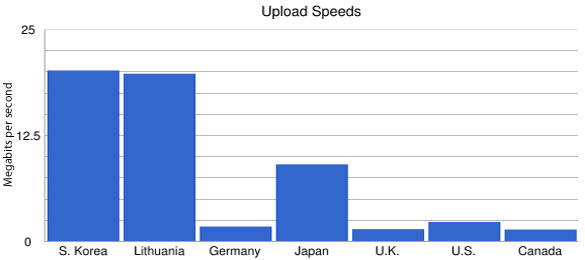
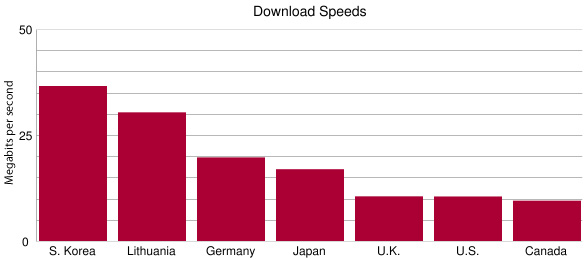
Our coverage of User-Based Billing (UBB) has resulted in the CRTC’s decision to implement this for Internet to be delayed thanks to you (415,000+). With some of the most expensive Internet bandwidth in the world, how do speeds in Canada compare with countries around the globe?

The CBC used data from netindex.com to compile the following graphs of Internet upload and download speeds, comparing Canada versus the world:

Interesting details:

  • Download speeds: Canada comes 36th in terms of average download speed, at 9.52 megabits per second (Mbps). The US is ranked 31st, the UK, 29th.
  • Upload speeds: Canada is in 64th spot globally, at 1.35Mbps, behind smaller countries with less developed infrastructures, including:
  • Mozambique, ranked 62nd, at 1.41Mbps.
  • Swaziland, ranked 61st, at 1.43Mbps.
  • Kenya, ranked 58th, at 1.52 Mbps.
  • Kazakhstan, ranked 40th, at 2.10Mbps.
  • Harvard’s Berkman Center for Internet and Society ranked Canada 25th out of 30 countries in a report that looked at pricing for services ranging from low-speed to high-speed connectivity.

CRTC Chairman Grilled by Commons Committee

CRTC chairman, Konrad von Finckenstein, appeared before a Commons Committee yesterday to justify and explain his decision over UBB. Here are some quotes from him:

…In light of these requests and the evident concerns expressed by Canadians, the Commission has decided to: Delay the implementation of usage-based billing for wholesale customers by at least 60 days…

…I would like to reiterate the Commission’s view that usage-based billing is a legitimate principle for pricing Internet services. We are convinced that Internet services are no different than other public utilities, and the vast majority of Internet users should not be asked to subsidize a small minority of heavy users. For us, it is a question of fundamental fairness. Let me restate: ordinary users should not be forced to subsidize heavy users.

…and here’s one more delightful video–Bell and the CRTC (NSFW; language):

You have to love living in Canada. StoptheMeter.ca

[Globe and Mail, CBC]

Tethered redsn0w Jailbreaks Can Run Greenpois0n Over It

Are you on a tethered jailbreak via redsn0w? Want to get the latest Greenpois0n jailbreak? It’s easy. Just run Greenpois0n over it, according to @MuscleNerd of the iPhone Dev Team:

Yes, tethered 4.2.1 redsn0w JBers can just run #greeenpois0n over it for untether (restore only if you have problem) about 13 hours ago via web

(The reason that works is tethered RS doesn’t touch boot sequence at all, but GP does. They stay out of each others way)

Also, if you’re having issues with the Loader not installing Cydia after jailbreaking via Greenpois0n, you can use redsn0w to install Cydia:

For those having trouble getting Cydia via the GP Loader, just let redsn0w install it (don’t choose the Monte option) about 14 hours ago

(The order doesn’t matter: run GP after redsn0w, or run redsn0w after GP)

So there you have it. The official word from The iPhone Dev Team. Read about redsn0w here first. Download redsn0w for Mac and Windows.


iOS 4.3 To Be Available On February 14, 2011?

Today, MacStories reports that it has heard from a “reliable source” that Apple is planning a February 14, 2011 public release for iOS 4.3 at 10AM PST.

According to several reports surfaced earlier this week, Apple is targeting a release of the next major iOS update, version 4.3, in two weeks. We just got word from a reliable source that iOS 4.3 should be available on February 14th at 10 AM PST.

There have been a few rumors pointing to an iOS 4.3 release in the next two weeks. Such examples include claims from various reviewers indicating that AT&T will have iOS 4.3 on February 13 to compete with Verizon.

Considering February 13 is a Sunday, it is an odd day for a firmware release. February 14 however is a Monday, and is much more likely.

I know I would just love a February 14th release day :) . Thoughts?

[Macstories]

Greenpois0n For Windows Coming This Weekend!

Earlier this week, the Chronic Dev-Team released the latest version of Greenpois0n, the popular iDevice jailbreaking tool.

The latest version features an untethered jailbreak for iOS 4.2.1. This means that users who jailbreak with Greenpois0n will be able to turn their iDevice off and on without having to tether their device to a computer upon reboot to properly use the device.

Upon initial release, the jailbreaking tool was Mac-only, leaving many Windows users frustrated. Well Windows users, your patience will be rewarded, as the Chronic Dev-Team has announced that they will release their untethered jailbreak for Windows users this weekend!

Site issues should be better soon thanks to @iOPK. Windows version should be out tomorrow or the next day

If you’re on a Mac, you can follow our guide to jailbreak. If you’re on Windows, you will be able to use the same steps!

[p0sixninja via Twitter]